User Account Settings
User account settings are presented as a modal dialog accessible from the account menu via “My Account”. The modal uses the same split-pane layout as organization settings — sidebar navigation on the left, scrollable content on the right — with three tabs.
Access
Section titled “Access”The modal is opened from the AccountMenu dropdown in the app shell. It can also be triggered programmatically via the settings modal state in AppShell.
Profile
Section titled “Profile”Displays and edits the user’s personal information:
- Avatar — Shows user initials as fallback
- Display name — Editable text field with save feedback
- Email — Read-only display (changed from Security tab)
- Language — Locale selector (persisted per user)
authClient.updateUser({ name: "New Name" })Security
Section titled “Security”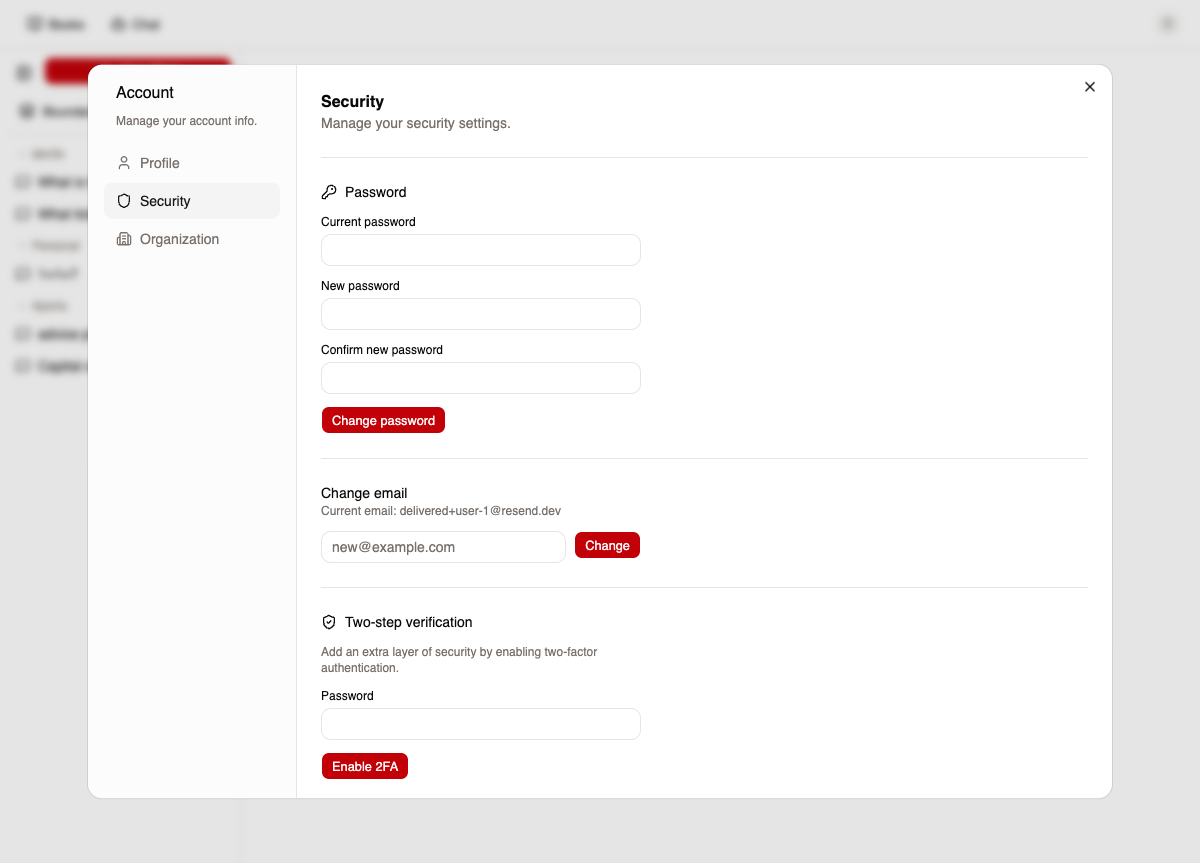
Comprehensive security management with six sections:
Change password
Section titled “Change password”Three-field form: current password, new password, confirm password. Changing the password automatically revokes all other sessions.
authClient.changePassword({ currentPassword: "old", newPassword: "new", revokeOtherSessions: true,})Change email
Section titled “Change email”Enter a new email address. A verification email is sent — the email is not changed until the user confirms the new address.
authClient.changeEmail({ newEmail: "new@example.com" })Two-step verification (TOTP)
Section titled “Two-step verification (TOTP)”Four-state flow:
| State | UI | Action |
|---|---|---|
| Not enabled | Password confirmation form | authClient.twoFactor.enable({ password }) |
| Setup | QR code + 6-digit code input | authClient.twoFactor.verifyTotp({ code }) |
| Backup codes | 8 single-use codes in 2-column grid | Save codes (shown once) |
| Enabled | Green status + disable button | authClient.twoFactor.disable({ password }) |
Backup codes are generated during enable and displayed once — they cannot be retrieved again.
Passkeys
Section titled “Passkeys”Conditional section — only shown when passkeys are enabled in system configuration.
- Add passkey — Opens the browser’s WebAuthn credential creation dialog
- List passkeys — Shows name and creation date for each registered passkey
- Delete passkey — Remove a specific passkey
authClient.passkey.addPasskey()authClient.passkey.deletePasskey({ id: passkeyId })Connected accounts (social)
Section titled “Connected accounts (social)”Link and unlink social provider accounts. Only shows providers enabled in system configuration.
| Provider | Available when |
|---|---|
socialProviders.google enabled |
|
| GitHub | socialProviders.github enabled |
| Apple | socialProviders.apple enabled |
| Microsoft | socialProviders.microsoft enabled |
// LinkauthClient.linkSocial({ provider: "google", callbackURL: "/settings" })
// UnlinkauthClient.unlinkAccount({ providerId })
Cannot unlink the last authentication method — at least one sign-in method must remain.
Devices / Sessions
Section titled “Devices / Sessions”Lists all active sessions with browser/device info (parsed from user agent) and last active date. The current session is marked with a badge.
// List all sessionsconst sessions = authClient.multiSession.listDeviceSessions()
// Sign out all other devicesauthClient.revokeOtherSessions()
Maximum: 5 concurrent sessions per user (enforced by backend).
Organization
Section titled “Organization”Lists all organizations the user belongs to with name, slug, and role badge (Owner, Admin, Member).
Leave organization — Available for non-sole-owners. If the user is the only owner, the button is disabled with a tooltip: “Transfer ownership to another member before leaving.”
authClient.organization.leave({ organizationId })Account deletion
Section titled “Account deletion”Located in the Security tab danger zone. Requires the user to type the confirmation phrase Delete my account into a text input.
Restrictions: Cannot delete account if the user is the sole owner of any organization. Must transfer ownership or delete the organization first.
Deletion process:
- Revokes all user sessions
- Removes all organization memberships
- Bans the user account
- Anonymizes PII: name →
[deleted-{userId}], email →deleted-{userId}@redacted.local - Audit logged
- Redirects to sign-in page
authClient.deleteUser({ callbackURL: "/sign-in" })Configuration flags
Section titled “Configuration flags”Several sections are conditionally displayed based on system configuration:
| Flag | Controls |
|---|---|
auth.passkeyEnabled |
Passkey section visibility |
socialProviders.{provider}.enabled |
Per-provider connect/disconnect |
security.passwordMinLength |
Password validation (default: 10) |
security.sessionDuration |
Session TTL (default: 24 hours) |
Key files
Section titled “Key files”| File | Purpose |
|---|---|
packages/web-shell/src/components/settings/user-settings-modal.tsx |
Modal shell and tab routing |
packages/web-shell/src/components/settings/tabs/profile-tab.tsx |
Name, avatar, and language editing |
packages/web-shell/src/components/settings/tabs/security-tab.tsx |
Password, 2FA, passkeys, social, sessions, account deletion |
packages/web-shell/src/components/settings/tabs/organization-tab.tsx |
Org membership list and leave |
packages/web-shell/src/components/account-menu.tsx |
Modal trigger in app shell |
packages/web-shell/src/components/shared/danger-zone.tsx |
Reusable destructive action component |
packages/backend/src/convex/modules/core/users/user_api.ts |
User deletion and PII anonymization |
packages/backend/src/convex/lib/core/auth/convex_auth.ts |
BetterAuth configuration (2FA, passkeys, social, sessions) |