Global Admin
The global admin portal provides platform-level management capabilities for users with the admin role. It is a dedicated section of the app accessible at /admin, protected by the AdminGuard component which redirects non-admins to the home page.
Role system
Section titled “Role system”The platform uses two separate role hierarchies:
| Scope | Roles | Managed by |
|---|---|---|
| Global | admin, member |
BetterAuth admin plugin |
| Organization | owner, admin, member |
BetterAuth organization plugin |
Global admins bypass organization-level permission checks — they have implicit access to all org-scoped operations.
Backend enforcement
Section titled “Backend enforcement”All admin endpoints use dedicated adminQuery and adminMutation builders that verify role === "admin" before execution:
export const adminQuery = /* ... requires global admin role ... */export const adminMutation = /* ... requires global admin role ... */Non-admin users receive a FORBIDDEN error.
Dashboard layout
Section titled “Dashboard layout”The admin portal has a tabbed navigation with six sections:
- Users — User management and moderation
- Organizations — Org lifecycle management
- Waitlist — Pre-launch access control
- Audit — Global audit log viewer
- Billing — Plan sync and overview
- Configure — System-wide settings
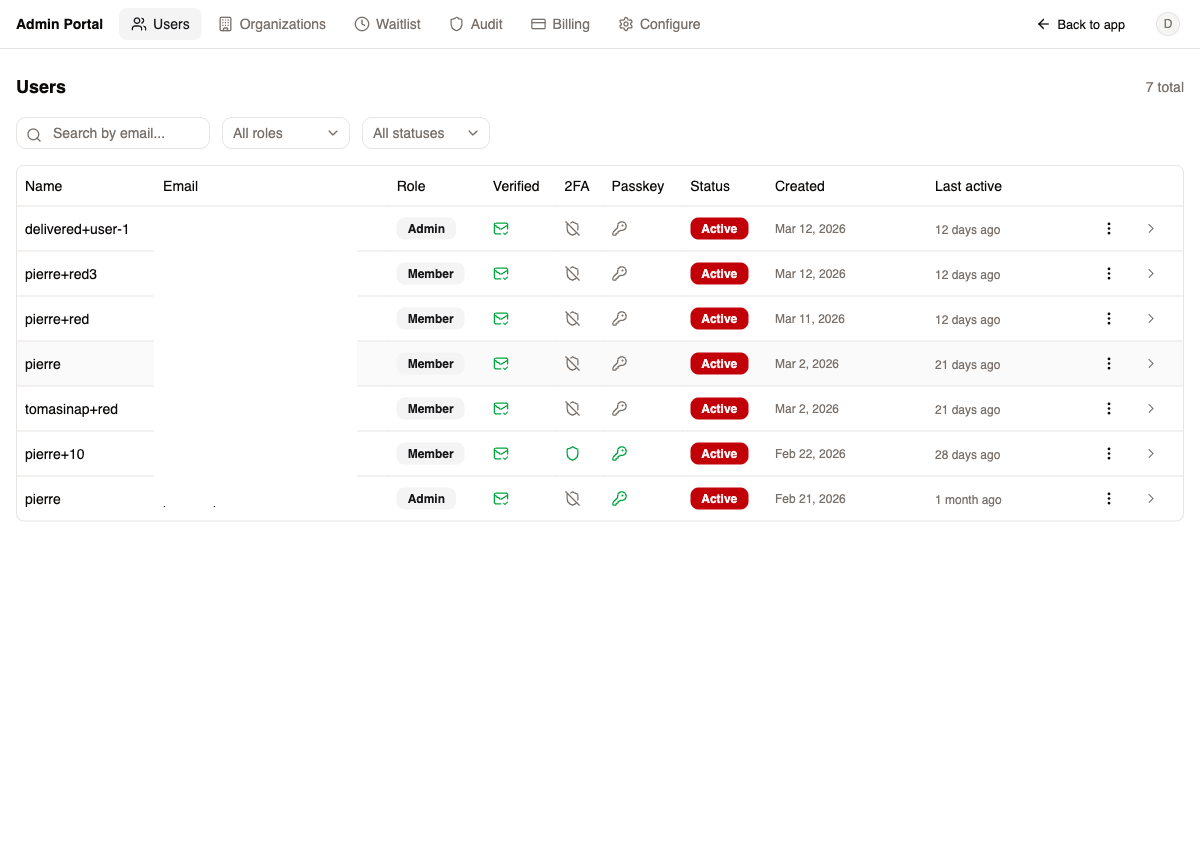
User list
Section titled “User list”Paginated table (25/page) with filters:
| Filter | Options |
|---|---|
| Search | By email |
| Role | Admin, Member |
| Status | Active, Banned |
Columns: Name, Email, Role, Email Verified, 2FA, Passkey, Status, Created, Last Active.
Per-user actions
Section titled “Per-user actions”| Action | Description |
|---|---|
| Copy reset link | Generate a password reset URL |
| Set password | Directly set a new password |
| Remove 2FA | Disable two-factor authentication |
| Invalidate sessions | Force sign out from all devices |
| Ban user | Block access with optional reason and expiration |
| Unban user | Restore access for banned user |
| Impersonate | Login as the user (blocked for other admins) |
| Delete user | Soft-delete with PII anonymization |
User detail page
Section titled “User detail page”Navigating to a user shows:
- Overview — Name, email, role badge, status (with ban reason if applicable), email verified, 2FA enabled, passkey registered, creation date
- Audit logs — All actions performed by or on this user, filterable by event name and status
Organizations
Section titled “Organizations”Organization list
Section titled “Organization list”Paginated table with search by name or slug. Columns: Name, Slug, Member count, Created date.
Create organization
Section titled “Create organization”Dialog with name, slug, and owner picker (search users by email). Creates the org directly in the database, bypassing the invitation flow.
Organization detail page
Section titled “Organization detail page”Sidebar navigation with five sections:
| Section | Capabilities |
|---|---|
| Overview | Name, slug, creation date, member count |
| Members | Table with roles, add member (bypasses invites), remove member |
| Billing | Current subscription, feature usage bars, sync from Autumn |
| Audit | Org-scoped audit logs with event/status filters |
| Settings | Read-only org info display |
Adding members from admin bypasses the invitation flow — the user is added directly with the specified role.
Waitlist
Section titled “Waitlist”Stats bar
Section titled “Stats bar”Displays total, pending, invited, and registered counts.
Management
Section titled “Management”| Action | Description |
|---|---|
| Search | Filter by email |
| Filter | By status (Pending, Invited, Registered) |
| Invite | Send single invite |
| Bulk invite | Invite multiple selected entries |
| Remove | Delete from waitlist |
Pagination at 25 entries per page with bulk checkbox selection.
Global audit log viewer with comprehensive filtering:
| Filter | Options |
|---|---|
| Actor ID | Text search |
| Event name | Text search |
| Status | All, Success, Failure, Denied |
| Date range | From/to date picker |
Columns: Timestamp, Actor ID, Actor Role, Action, Target Type, Target ID, Status, Org ID, IP.
Features:
- Actor name resolution (maps IDs to user info)
- CSV export
- Pagination at 50 entries per page
Billing
Section titled “Billing”| Action | Description |
|---|---|
| Sync from Autumn | Pull all plans and features from Autumn to local cache |
| View plans | Table showing name, plan ID, price, free trial, entitlements, status |
| View features | List all billing features synced from Autumn |
The “Sync from Autumn” button is the primary mechanism for updating the local billing cache after making changes in the Autumn dashboard.
Configure
Section titled “Configure”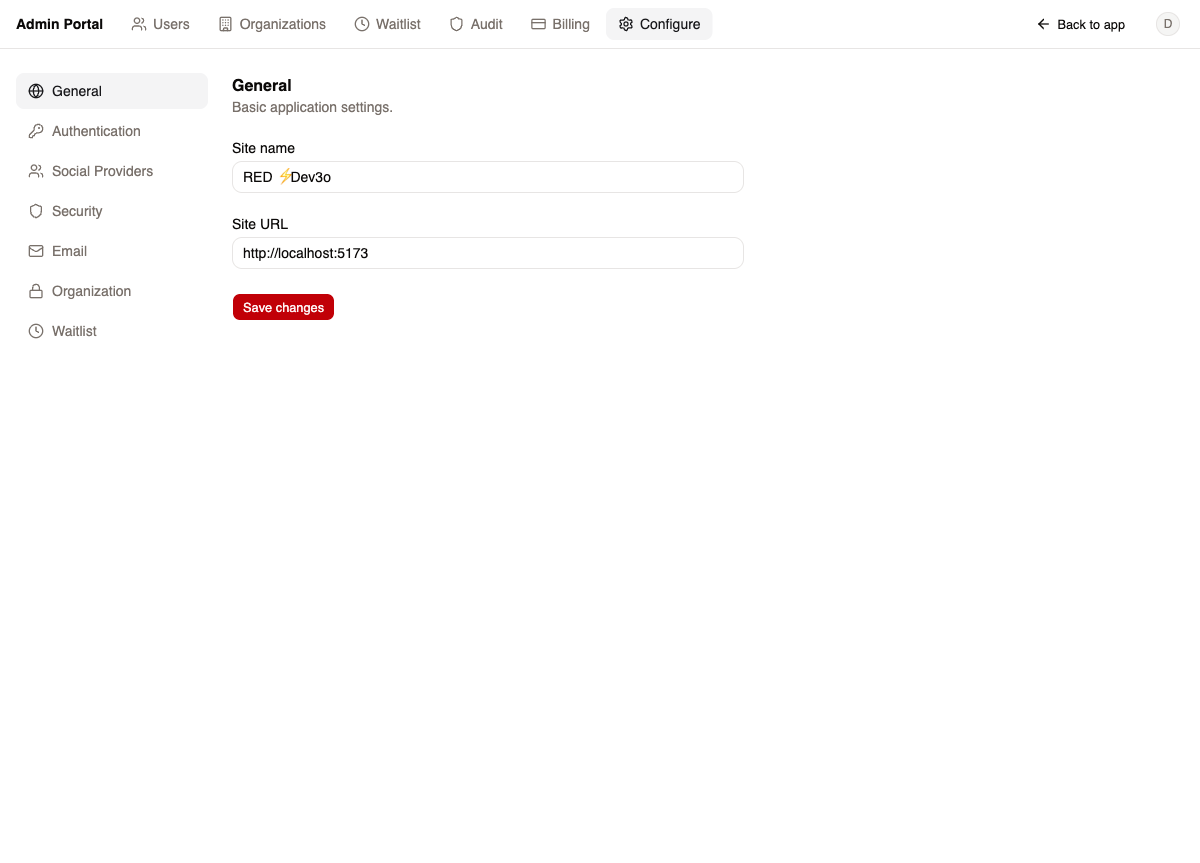
System-wide configuration organized into seven sections:
| Section | Settings |
|---|---|
| General | Site name, site URL |
| Authentication | Self-signup, email verification, org creation (see below) |
| Social Providers | Google, GitHub, Apple, Microsoft (enable/disable + credentials) |
| Security | Session duration, rate limits, password requirements |
| Sender email/name, transactional email settings | |
| Organization | Member limits, invitation expiration |
| Waitlist | Enable/disable, email template, Resend segment |
All settings are persisted via config_api.upsert() and read via config_api.getAll().
Access control toggles
Section titled “Access control toggles”Three authentication toggles control how users access the platform:
| Toggle | Effect when disabled |
|---|---|
| Allow self-signup | Users cannot register on their own — they must be invited by an org owner or added by an admin |
| Allow organization creation | Users cannot create organizations — only global admins can. This effectively enables single-tenant operation or controlled multi-tenancy where the admin decides which orgs exist |
| Waitlist | When enabled, users must receive an invite token before they can register. Combines with self-signup to create a gated onboarding flow |
These toggles let you adapt RED to different go-to-market strategies: open self-service, invite-only beta, controlled enterprise rollout, or single-tenant deployment.
Impersonation
Section titled “Impersonation”Admins can impersonate non-admin users to debug issues:
- Click “Impersonate” on a user row
- BetterAuth creates an impersonation session with
impersonatedBymetadata - A yellow warning banner appears at the top of the app showing who is being impersonated
- “Stop impersonating” restores the admin session
Admins cannot impersonate other admins — this is enforced by the BetterAuth admin plugin.
Audit trail
Section titled “Audit trail”All admin mutations are automatically logged with:
- Actor ID and role
- Event name (e.g.,
admin.user.ban,admin.org.create,admin.org.member.add) - Target type and ID
- Organization ID (when applicable)
- IP address
- Request details
- Status (success/failure)
Key files
Section titled “Key files”| File | Purpose |
|---|---|
packages/backend/src/convex/modules/core/admin/admin_user_api.ts |
User queries (passkey status, user by ID) |
packages/backend/src/convex/modules/core/admin/admin_org_api.ts |
Org CRUD, member management, actor resolution |
packages/backend/src/convex/functions.ts |
adminQuery / adminMutation builders |
packages/backend/src/convex/lib/core/permissions.ts |
Global and org-level AC definitions |
packages/backend/src/convex/lib/core/auth/auth.ts |
requirePermission() enforcement |
packages/backend/src/convex/modules/core/config/config_api.ts |
Dynamic configuration read/write |
packages/web-admin/src/admin.tsx |
Admin dashboard layout and navigation |
packages/web-admin/src/users-tab.tsx |
User management tab |
packages/web-admin/src/organizations-tab.tsx |
Organization management tab |
packages/web-admin/src/billing-tab.tsx |
Billing sync and overview |
packages/web-admin/src/audit-tab.tsx |
Global audit log viewer |
packages/web-admin/src/waitlist-tab.tsx |
Waitlist management |
packages/web-admin/src/configure-tab.tsx |
System configuration |
packages/web-shell/src/components/admin-guard.tsx |
Route guard for admin access |
packages/web-shell/src/components/impersonation-banner.tsx |
Impersonation UI banner |